# Set up if you want to migrate from another platform

## Set up

### Prerequisites for set up

If you are migrating from another platform, the migration process is very simple (you are minutes away to start using GoChat)

* Admin access to your Meta Business Manager account
* WhatsApp Business Account configured with an active phone number and an active billing card

### Instructions step by step

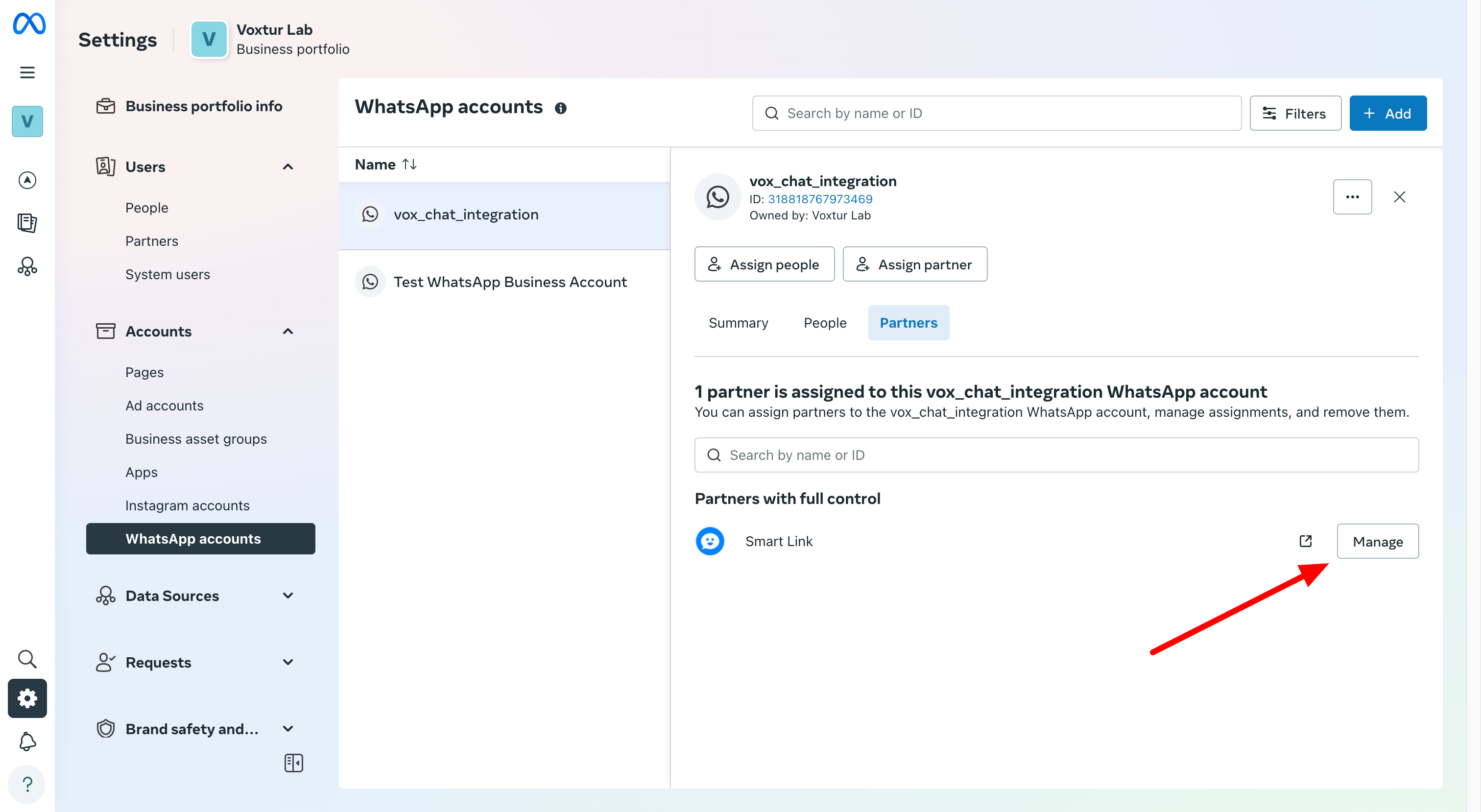
**Step 1: Remove the current Partner if you see one**

Login to Facebook configuration where the WABA is and remove the Partner that is associated&#x20;

<figure><img src="https://209400121-files.gitbook.io/~/files/v0/b/gitbook-x-prod.appspot.com/o/spaces%2FchRbCWJQsHqKDm9YNbUD%2Fuploads%2FsOwzKO6wqGZXB9iXL2lG%2Fimage.png?alt=media&#x26;token=bb860a2d-cae6-4dd5-9f5f-09cb68ba260d" alt=""><figcaption></figcaption></figure>

<figure><img src="https://209400121-files.gitbook.io/~/files/v0/b/gitbook-x-prod.appspot.com/o/spaces%2FchRbCWJQsHqKDm9YNbUD%2Fuploads%2FExzaFloMOxsemnlZVQwH%2Fimage.png?alt=media&#x26;token=4d4a5395-5435-4445-9a66-2824abc18e32" alt=""><figcaption></figcaption></figure>

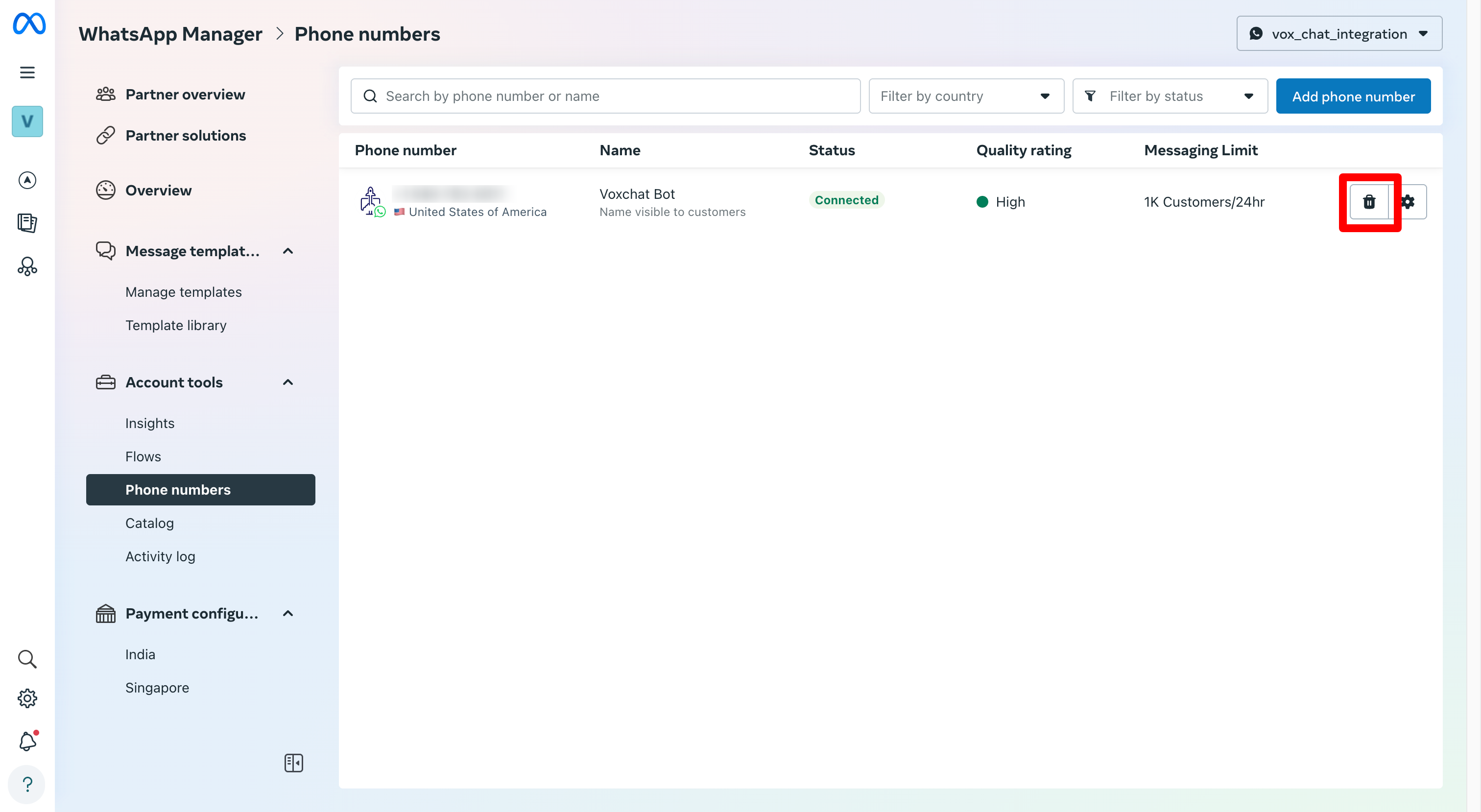
#### Step 2: Delete Whatsapp phone in the Whatsapp manager

Go to the whatsapp manager

<figure><img src="https://209400121-files.gitbook.io/~/files/v0/b/gitbook-x-prod.appspot.com/o/spaces%2FchRbCWJQsHqKDm9YNbUD%2Fuploads%2FIkRddtBiYeQSge8oXTFh%2Fimage.png?alt=media&#x26;token=6b86b70b-9e01-4175-8540-01f0c57e53c3" alt=""><figcaption></figcaption></figure>

Delete the phone number from the Whatsapp Business Account created by the third party platform

<figure><img src="https://209400121-files.gitbook.io/~/files/v0/b/gitbook-x-prod.appspot.com/o/spaces%2FchRbCWJQsHqKDm9YNbUD%2Fuploads%2F8n4KBFmfLaL6uUU3g90s%2Fimage.png?alt=media&#x26;token=cd94d97c-47e2-4ae2-8bfa-c80e1db86204" alt=""><figcaption></figcaption></figure>

<figure><img src="https://209400121-files.gitbook.io/~/files/v0/b/gitbook-x-prod.appspot.com/o/spaces%2FchRbCWJQsHqKDm9YNbUD%2Fuploads%2FmvoaHEZecDzCkPSCizi9%2Fimage.png?alt=media&#x26;token=1f181302-f784-4943-b38f-5c2856c7b116" alt=""><figcaption></figcaption></figure>

#### Step 3: In GoChat login in Facebook in the Whatsapp API channel

Follow the steps from Step 1 described in [whatsapp-cloud](https://gochat.gitbook.io/docs/channels-and-integrations/whatsapp-cloud/whatsapp-cloud "mention")